

IFO token sale · opening soon

The IFO token sale is coming. Join the waitlist.

IFO is the InfraIO Pay token. 400,000 of the 10,000,000 IFO are sold in 4 rounds. You claim IFO on Base: part at TGE, the rest over the following months. Join the waitlist and we email you when each round opens.

NetworkBasePay withUSDCUSDT

Next: Round 1

$0.25per IFO

$1,000 will buy 4,000 IFO

$0 raised of $200,000

  1. $0.40Early
  2. $0.60Public
  3. $1.00Final

Crypto payments for any merchant. Link, SDK, or API.

Non-custodial stablecoin checkout. No setup fee, no monthly minimum. You pay only when a buyer pays you.

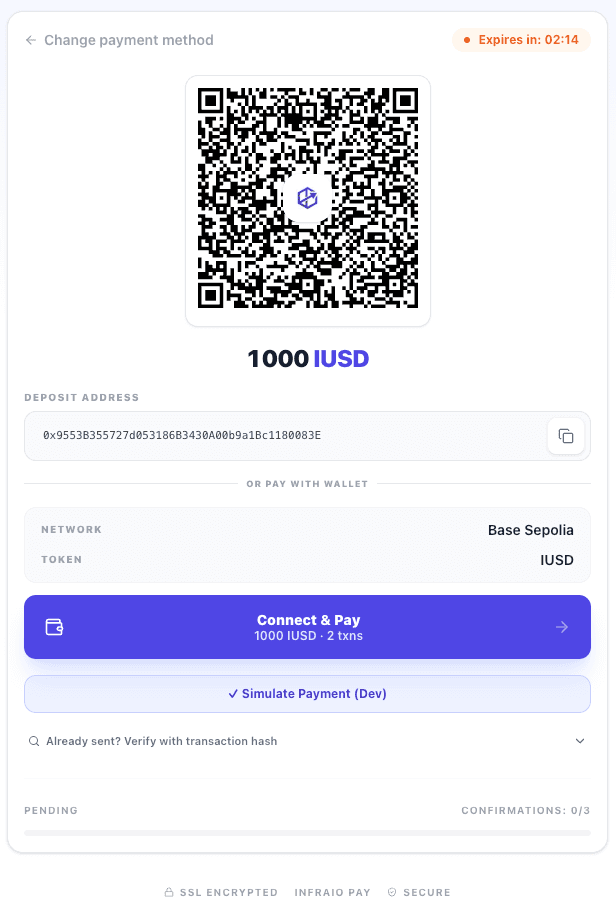
InfraIO Pay checkout: QR code and deposit address to pay on-chain
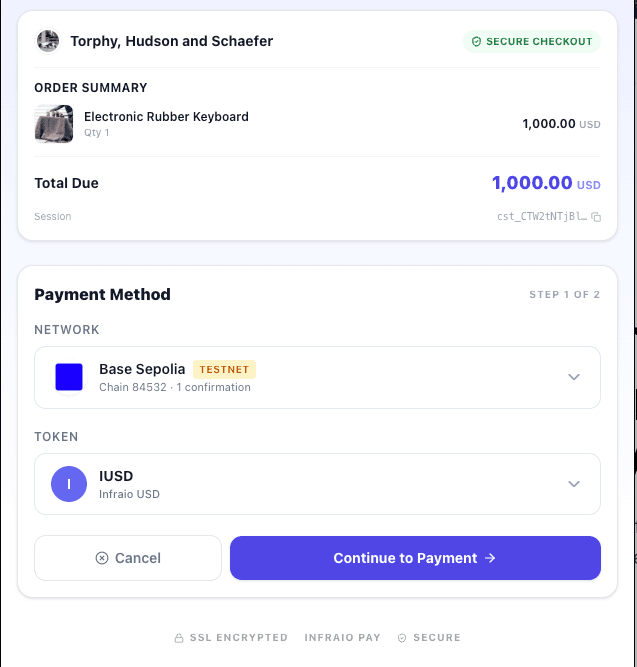
InfraIO Pay checkout: order summary with network and token selection
Payment settled +$998.20
Live on 6 EVM networks · TRON, Solana and TON coming soonEthereumPolygonBaseBNB ChainArbitrumOptimismTRONSolanaTON
0Setup fees · monthly mins · failed-payment charges
0.3%Platform fee from $250K a month. Starts at 0.5% and drops automatically as you grow
6Networks live today for USDC and USDT, with TRON, Solana and TON coming soon
<1 dayFrom signup to first paid payment link

Crypto payments without the operational mess

Orders, payments and notifications that work out of the box. No copy-pasting wallet addresses, no reconciliation spreadsheets.

With a card processor

Setup fees + monthly minimums
High card fees
Fees stay flat as you scale
Chargebacks
Buyers on different wallets and networks
Manual reconciliation
Heavy integration

With InfraIO Pay

Free to set up. Nothing to pay until a buyer pays you.
No card-network fees, just one platform fee
Down to 0.3% per transaction, fee drops automatically with your monthly volume
No chargebacks: a payment is final once it confirms
Buyers pick their token and network at checkout
Every payment is matched to its order automatically
A payment link, the web SDK, or one API call
How merchants accept

Three ways to accept payment

Start with whatever fits today and switch any time.

SDK Checkout

Add the InfraIO Pay SDK to your site and open checkout as a popup, a redirect, or embedded in your page.

infraio.checkout.open({ sessionId })
Read the SDK guide →

Checkout API

Create the order and its checkout from your server in one call, then send the buyer to the link.

POST /v1/quick-checkout
Read the API reference →

Your tokens. Your networks. Your call.

Choose which stablecoins you accept and on which networks: EVM networks, TRON, Solana and TON. Add your own ERC-20 token on EVM. Buyers only see the options you turn on. Need an EVM network that isn't listed? We can add it.

NetworkUSDCUSDTYour ERC-20
Ethereum✓✓+
Base✓—+
Polygon✓✓+
Arbitrum✓✓+
Optimism✓✓+
BNB Chain✓✓+
TRONComing soon—✓—
SolanaComing soon✓✓—
TONComing soon—✓—
Any other EVM network○○+
USDC and USDT are ready on every network above, except Base (USDC only), TRON (USDT only) and TON (USDT only). On EVM networks you can also add your own ERC-20 token from the dashboard. On TRON, Solana and TON the buyer pays your wallet directly. TRON, Solana and TON are coming soon.
Beyond checkout

A merchant app, a wallet, and what is next

InfraIO Pay is more than a payment link. Run your business from your phone, give customers a passkey wallet, and see what is on the way.

Coming soon to the stores

InfraIO Pay merchant app

iOS and Android. Sign in with a passkey or Face ID, follow orders and transactions as they happen, create payment links, issue refunds and share your referral card, all from your phone.

  • Passkey / Face ID sign-in
  • Orders and payment links
  • Refunds
  • Referral card
Launching on Base

InfraIO Wallet

A non-custodial smart-account wallet secured by a passkey. No seed phrase needed to get started, with an optional 12-word recovery phrase as a backup. The same address on every EVM network, send and receive, contacts, NFTs and WalletConnect for dApps.

  • No seed phrase to start
  • Same address on EVM networks
  • Send, receive and contacts
  • NFTs and WalletConnect

How the wallet works →

Live

Paid straight to your wallet

Depending on the network, the buyer pays your wallet directly, or pays an address made for that order that passes the money on to your wallet automatically. Either way InfraIO Pay never holds your funds. Try it all first in Test mode, with no real money.

  • Paid to your own wallet
  • One address per order
  • Test mode, no real money

Coming soon

On our roadmap, shown here so you can plan ahead. Shopify works today.

Subscriptions and recurring invoicesRecurring billing with subscription and invoice webhooks.Coming soon
WooCommerce pluginAccept stablecoins in a WooCommerce store.Coming soon
WHMCS moduleTake crypto payments for hosting and VPS billing in WHMCS.Coming soon
Pay with cardA fiat on-ramp inside checkout: the buyer pays by card, you still settle in stablecoins.Coming soon
Mobile apps

Two apps: one for your shop, one for you

Take payments with InfraIO Pay, or keep your own crypto in InfraIO Wallet. Both are coming soon to iOS and Android.

InfraIO Pay

Create orders, share payment links and QR codes, and follow every payment.

Coming soonApp StoreComing soonGoogle Play
How the app works →
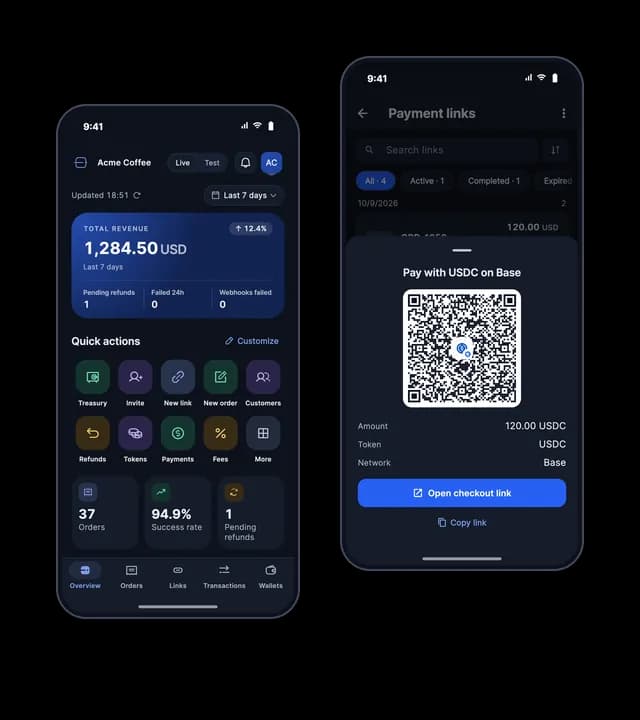
Two screens of the InfraIO Pay app: the Overview with revenue and quick actions, and a QR code to pay in USDC on Base.

InfraIO Wallet

A personal wallet you open with Face ID. Send, receive and connect to apps.
Coming soonApp StoreComing soonGoogle Play
What the app does →
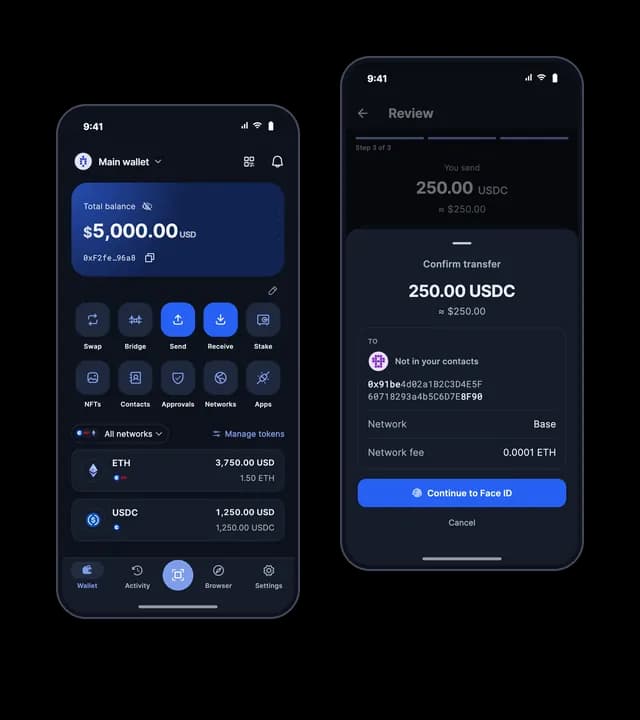
Two screens of the InfraIO Wallet app: the wallet home with a balance and action buttons, and a transfer confirmed with Face ID.

The apps are not available to download yet. These buttons will light up as soon as they reach the stores.

Free until a buyer pays.

0.3%per settled transaction · drops automatically with volume
See full pricing

Built like payment infrastructure

Signed API requestsEvery request from your server is signed and time-stamped, so nobody can forge it or replay an old one.
Checkout links that can't be tampered withEach checkout link belongs to one order. Change it and it stops working, and once it expires it can't be used again.
No double chargesIf your server retries after a network error, the buyer is still charged only once.
Your money never sits with usBuyers pay an address made for their order, or your wallet directly. Either way the money goes to you, and InfraIO Pay never holds buyer funds in a shared account.

Frequently asked

How does checkout work?

You create a checkout from the dashboard, a payment link, or your server. The buyer opens it, picks a token and network, and pays from their own wallet. You're notified as soon as the payment confirms. On your own site, the SDK opens the same checkout as a popup, a redirect, or embedded in your page.

Can I create crypto payment links?

Yes. In the InfraIO Pay dashboard, create a payment link with a fixed amount and the tokens you accept. Share it anywhere: invoices, support chats, social. The buyer opens the hosted checkout, and you get a signed webhook when the payment settles. Reusable links and creating links through the API are coming soon.

Does InfraIO Pay support popup and redirect checkout?

Yes, plus embedded checkout. The InfraIO Pay SDK has three modes: popup (the default), redirect (full page), and embed (inside your own page). All three open the same checkout and send the same events.

All 18 questions →

Add crypto checkout without rebuilding your payment stack

Use payment links today, SDK checkout tomorrow, and API-first automation when you’re ready.